All routers have a loopback address applied that matches their router name.
For Example R1 = 1.1.1.1/32
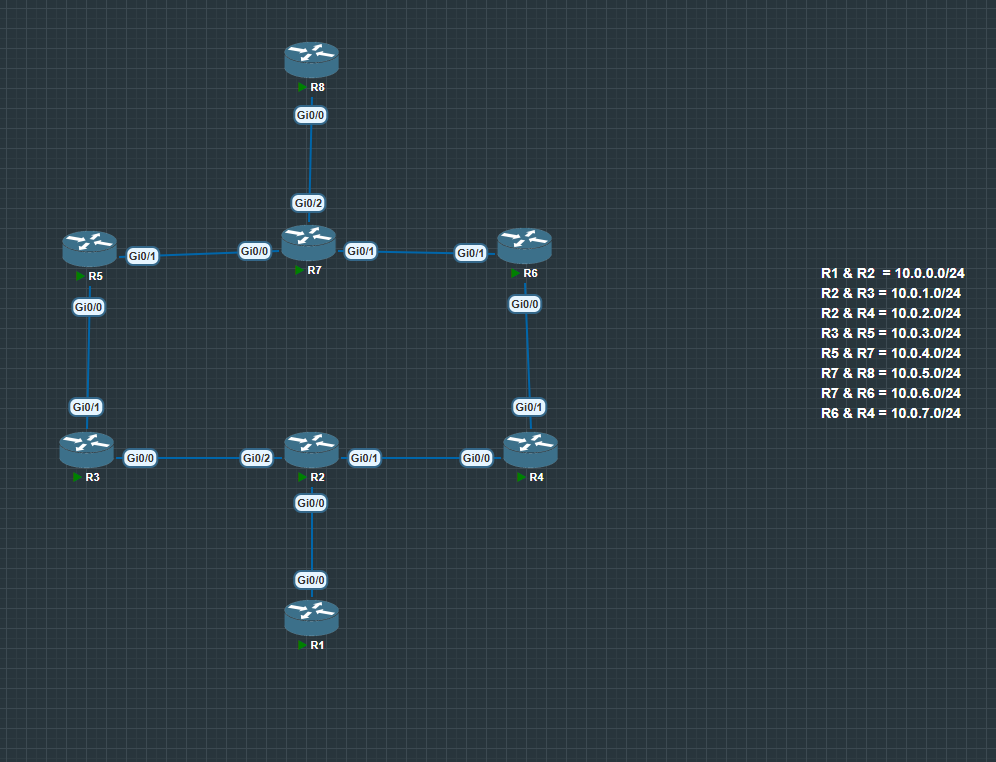
Interface IPs follow a consistent pattern: x.x.x.(Router Number). For example, on subnet 10.0.0.0/24 between R2 and R8, R2 uses 10.0.0.2/24 and R8 uses 10.0.0.8/24.
All Subnets and IGP Routing has been pre-configured.
Basic PBR
- Forward traffic from a specific source (e.g., 10.0.0.1 on R2) toward a destination (e.g., R1 → R4) over a non-default path (e.g., via R3 instead of R4).
Example R2 Configuration
Force traffic from R1 to go via R3 instead of R4:
R2> enable
R2# conf t
R2(config)# ip access-list standard 1
R2(config-std-nacl)# permit host 10.0.0.1
R2(config)# route-map R1toR4 permit 10
R2(config-route-map)# match ip address 1
R2(config-route-map)# set ip next-hop 10.0.1.3
R2(config)# interface g0/0
R2(config-if)# ip policy route-map R1toR4
- Verify that the PBR overrides the normal routing table using:
1. show ip policy
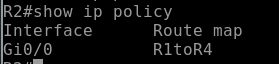
Key Points:
- Route-map applied: Confirms that
R1toR4is applied inbound on interfaceG0/0. - Direction: PBR is always inbound.
- If this output were missing the interface or route-map, PBR would not take effect.
2. show route-map
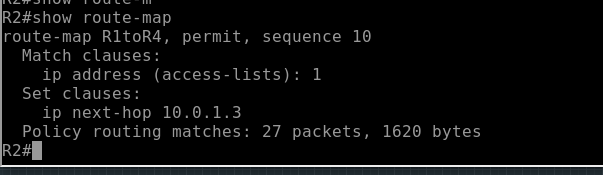
Key Points:
- Sequence 10 exists: Confirms the route-map has at least one sequence.
- Match statements: Shows
match ip address 1only traffic matching ACL 1 is impacted. - Set statements: Shows
set ip next-hop 10.0.1.3this is the critical action that overrides the routing table. - As you can see from the output packets are hitting the Policy routing matches counter verifying its working correctly.
- Implicit deny: Anything not matching sequence 10 will follow normal routing. This explains why traffic from other sources still takes the default path.
3. traceroute
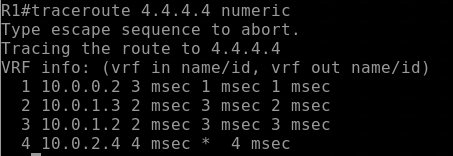
Key Points:
- Traffic steering verified: The traceroute confirms that packets from 10.0.0.1 are going to the intended next-hop (R3) instead of the default R4 path.
- Fallback check: If PBR did not match or the next-hop was unreachable, the packets would follow the routing table this did not happen, showing the policy is working.
- Use traceroute for path verification: Shows each hop and confirms the traffic actually follows the overridden path.
4. Debug Command
For lab and troubleshooting purposes, you can use the debug command to see real-time PBR processing. This is useful to verify that traffic is matching your route-map and going to the correct next-hop.
debug ip policy
What It Shows:
- Packet hits a PBR-enabled interface
- Whether the route-map sequence is matched
- The next-hop or interface chosen by the PBR policy
- Packets that do not match the policy (they fall back to normal routing)
Notes
- PBR can also match on other attributes such as protocol, destination IP, or port numbers.
Multiple Next-Hop Failover
PBR allows you to configure multiple next-hops in a single route-map set ip next-hop statement. This provides basic conditional failover if the primary next-hop becomes unreachable.
Example R2 Configuration
R2> enable
R2# conf t
R2(config)# ip access-list standard 1
R2(config-std-nacl)# permit host 10.0.0.1
R2(config)# route-map R1toR4 permit 10
R2(config-route-map)# match ip address 1
R2(config-route-map)# set ip next-hop 10.0.1.3 10.0.2.4
R2(config)# interface g0/0
R2(config-if)# ip policy route-map R1toR4
set ip next-hop 10.0.1.3 10.0.2.4→ router will attempt 10.0.1.3 first, and if unreachable, fallback to 10.0.2.4.- Only traffic matching ACL 1 (10.0.0.1) is affected.
- Traffic from other sources continues to follow the normal routing table.
Simulating Failover
- Shut down the primary next-hop interface (e.g., on R3):
R2(config)# interface g0/2
R2(config-if)# shutdown
- Verify with
traceroutefrom 10.0.0.1:
- The router now forwards packets to 10.0.2.4 (secondary next-hop).
- Traffic continues without following the default R4 path.
Important Behavior to Understand
This failover behavior only works when the next-hop becomes unreachable from the router’s perspective.
In practice, this usually means:
- The interface toward the next-hop goes down, or
- The router no longer has a route to the next-hop IP.
If the neighbor router stays up but its downstream link fails, and there is still a route to the ip address. In that situation:
- R2 will continue sending traffic to the primary next-hop.
- The upstream router (R3) will drop the traffic.
- This results in a blackhole.
This is a very common real-world PBR issue.
Preventing Blackholes (IP SLA)
In production networks, you usually combine PBR with IP SLA tracking.
IP SLA can:
- Actively test reachability to the next-hop or a remote destination
- Withdraw the primary next-hop if the probe fails
- Allow traffic to switch to the backup path automatically
Without reachability tracking, PBR has no awareness of downstream failures.
IP SLA Configuration on R2
! Probe for Primary Next-Hop
ip sla 1
icmp-echo 10.0.1.3
frequency 5
ip sla schedule 1 life forever start-time now

! Probe for Secondary Next-Hop
ip sla 2
icmp-echo 10.0.2.4
frequency 5
ip sla schedule 2 life forever start-time now

track 10 ip sla 1 reachability
track 20 ip sla 2 reachability
- IP SLA 1 continuously tests reachability to the primary next-hop.
- IP SLA 2 tests the secondary next-hop.
- Tracking objects monitor the success or failure of these probes.
PBR with Next-Hop Availability Verification
Now we update the route-map to reference the tracking objects:
route-map R1toR4 permit 10
match ip address 1
set ip next-hop verify-availability 10.0.1.3 1 track 10
set ip next-hop verify-availability 10.0.2.4 2 track 20
verify-availabilitytells the router to check the tracking object before using the next-hop.- If track 10 fails, the router skips
10.0.1.3and uses10.0.2.4. - If both fail, traffic falls back to normal routing.
Verification
To verify that PBR failover with IP SLA tracking is working, we can compare traceroute output before and after the primary path fails.
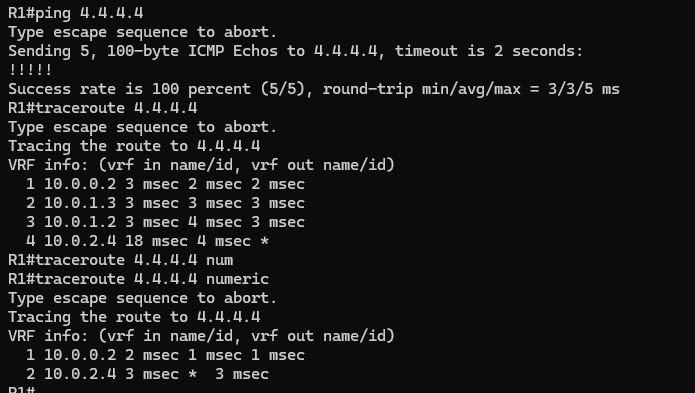
Things to Notice
Before the Failure
- Traffic leaves R1 and reaches R2 (10.0.0.2) first.
- The next hop is R3, which is the primary next-hop (10.0.1.3) configured in the route-map.
- This confirms:
- The route-map matched the traffic.
- IP SLA reports the primary next-hop as reachable.
- PBR is overriding the normal routing table.
After the Failure
- The interface toward R3 is shut down to simulate a path failure.
- IP SLA detects that the primary next-hop is no longer reachable.
- The tracking object changes state.
Now when the traceroute runs again:
- Traffic still reaches R2 first.
- Instead of forwarding to R3, traffic is redirected to the secondary next-hop (10.0.2.4).
- This confirms the router has failed over to the backup path.
PBR with Interface vs. Next-Hop
PBR allows you to control forwarding decisions using either a specific next-hop IP or by forcing traffic out of a particular interface. While both methods can steer traffic, they behave differently and have different design implications.
Advantages of Next Hop ip:
- Works well on multi-access networks.
- Allows multiple next-hop options.
- Can be combined with IP SLA tracking.
- Provides more predictable forwarding behavior.
Using set interface
Instead of specifying a next-hop, you can force traffic out an interface.
route-map R1toR4 permit 10
match ip address 1
set interface g0/2
What happens:
- The router sends the packet directly out the specified interface.
- The router must determine the correct Layer 2 destination for that packet.
This works best on point-to-point links.
Limitations on Multi-Access Networks
On Ethernet segments with multiple devices, set interface can cause problems.
Why:
- The router does not know which Layer 2 destination should receive the packet.
- The router may attempt ARP resolution for the final destination IP instead of the next-hop router.
- If that destination is not on the local segment, the packet may fail or behave unpredictably.
Example issue:
- R2 forces traffic out
G0/2. g
- The destination network is multiple hops away (R8).
- R2 attempts ARP for the remote destination, which will fail.
This is why Cisco generally recommends using set ip next-hop instead of set interface on Ethernet networks.
set ip default next-hop
set ip default next-hop is a Policy-Based Routing (PBR) command that specifies a next-hop only if the router does not already have a route in its routing table.
This makes it useful when you want PBR to act as a fallback path rather than forcing traffic away from the routing table’s decision.